

The calculator shares most assumptions with the standard Steel Beam calculator, with a few torsion-specific notes:
- Warping torsion is not considered; only closed-section torsional checks are performed.
- Members are assumed to be straight and prismatic (no tapering).
- Axial loads due to twist are assumed negligible.
- This is a particularly important point for inclined beams, in which axial load is by definition non-zero; it is left to the engineer to verify that the axial load is, in fact, negligible.
1
Inputting Key Properties
At the top of the calculator, you’ll choose your steel section: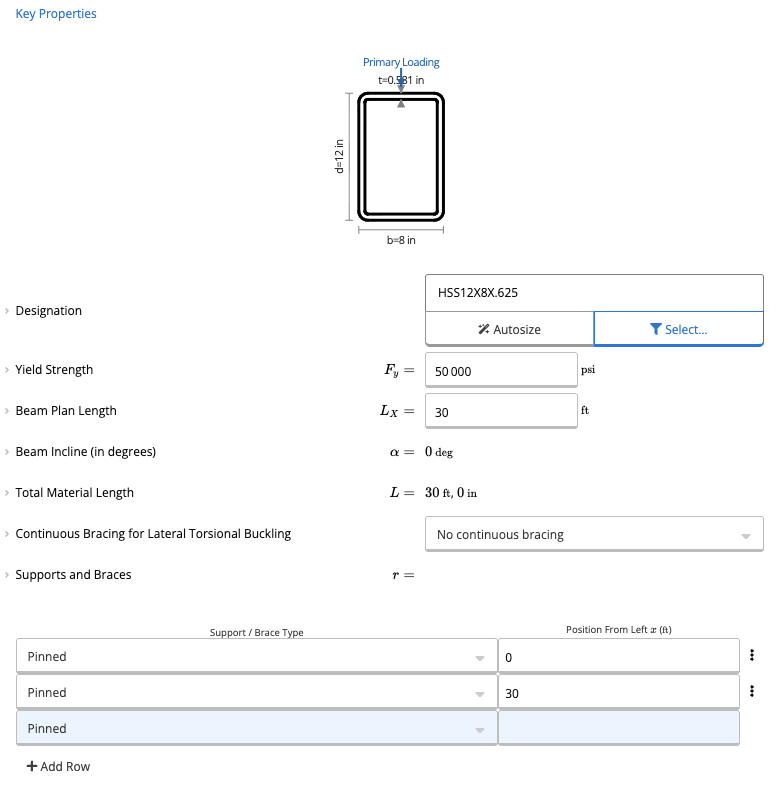
- Open the Member Selector.
- Select the desired HSS section (closed sections only are currently supported for torsion).
- Adjust material and member properties as needed:
- Yield strength (Fy)
- Beam span length
- Bracing conditions
2
Applying Torsional Load Input
The first load shown is the Required Torsional Load (T_req):
- This value represents the factored torsional moment applied to the beam.
- This load represents the twist-inducing moment acting on the member.
3
Applying Additional Loads
Similar to the regular Steel Beam calculator, you may add:
- Distributed loads
- Line loads
- Point loads
Reviewing the Calculations
This calculator will compute the flexural capacity based on AISC 36-16 Chapter F. Similar to the steel beam calculator, governing lateral torsional buckling checks are completed. Calcs.com checks for the moment modification factor using the quarter-moment method, which is later used to determine the LTB moment resistance. This calculator also does a simple shear capacity check. For the closed section torsion checks, you can scroll to the bottom of the calculator and open the below dropdown.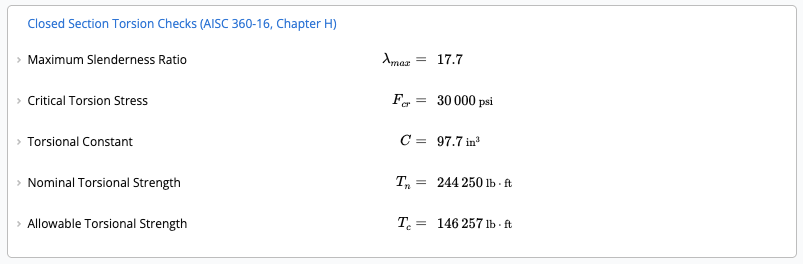
Combined Loading Check
If your torsional demand exceeds 20% of the allowable torsional strength, the calculator automatically performs a combined torsion + shear + axial interaction check. For example, if the torsional demand is increased to reflect higher loading:- The calculator evaluates the interaction equation defined by AISC.
- A combined utilization result (e.g., 0.54 < 1.0) will appear, confirming compliance.