

projectDefaults("Reference ID") formula to access values set in the project defaults.
We’ve made a cheat sheet here to help you see all the different values you can access from the Project Defaults.
All of these values are unit-aware, so they’ll automatically handle unit conversions (we’ll also check that units are convertible).
Example - Numeric Input
Apply the snow load from project defaults as a distributed load in PFS on rafters: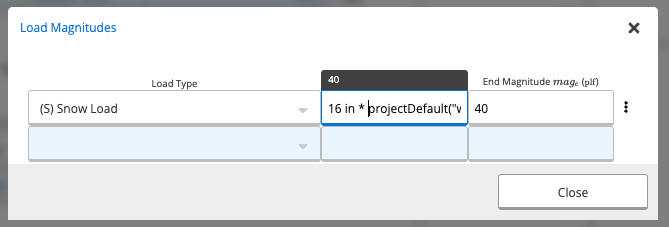
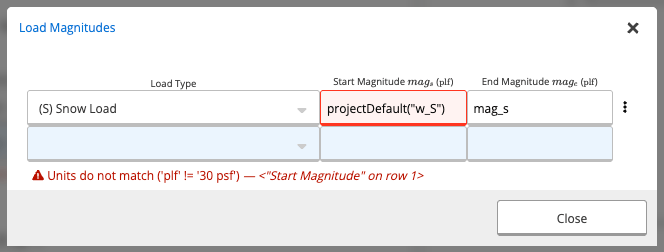
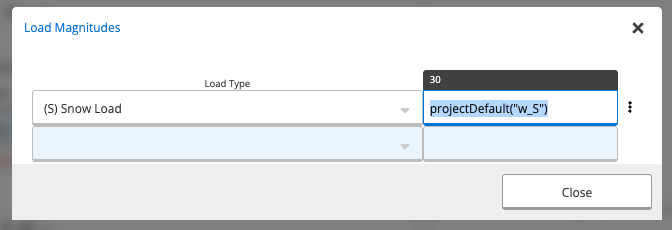
Reference Chart
The tables below give you a list of all the different values that can be access from Project Defaults. Something else you’d like to see on this list? Let us know by contacting our Support team!Loads
| Reference ID | Label | Description | Units |
|---|---|---|---|
| w_DR | Roof Superimposed Dead Load | psf | |
| w_Lr | Roof Live Load | psf | |
| P_Lr2 | Concentrated Roof Live Load | kip | |
| w_S | Roof Snow Load | psf | |
| w_Wu | Roof Wind Uplift Load | psf | |
| w_Wd | Roof Wind Downward Load | psf | |
| w_DC | Ceiling Superimposed Dead Load | psf | |
| w_LC | Ceiling Live Load | psf | |
| P_L2C | Concentrated Ceiling Live Load | kip | |
| w_DF | Floor Superimposed Dead Load | psf | |
| w_L | Live Load | psf | |
| P_L2 | Alternative Minimum Live Load | kip | |
| w_DEW | Weight of Exterior Wall | This is the total dead load - including both self-weight and superimposed dead loads | psf |
| w_Ww | Inward Wind Load (C&C) | psf | |
| w_Wuw | Outward Wind Load (C&C) | psf |
Environmental Parameters
| Reference ID | Label | Description | Units |
|---|---|---|---|
| V | Basic Wind Speed | The basic wind speed used for the calculation of wind loads. By default, we calculate this automatically. Using the site coordinates, we interpolate between wind speed contour lines provided in the ASCE 7-16 maps. We currently support these calculations for the continental US and for Alaska. Note that some local jurisdictions may override the ASCE 7 maps and impose a minimum design wind speed. This can be confirmed with your local building code or building department. | mi/hr |
| p_g | Ground Snow Load | Base snow load. Values can be found from ASCE 7-16, Table 7.2-2 | psf |
| V_T | Tornado Speed | Input the tornado speed obtained from Figures 32.5-1 and 32.5-2, or by checking the ASCE Hazard Tool. | mph |
| S_s | Short-Period Spectral Acceleration | The mapped maximum targeted risk spectral acceleration parameter based on 5% damping for a 0.2 second period. This ground motion parameter is determined by creating a ground motion acceleration response spectrum based on the peak ground motion (PGA) from historical ground motion data. This spectrum is given in terms of spectral acceleration (Sa) given as a percentage of gravitational acceleration over multiple periods T. In particular, the standardized period of 0.2 s for the short period was determined to represent the shortest effective period of most structures. Thus, the Sa value at a period of 0.2 s is Ss. Using this in conjunction with S1 and TL allows the plotting of the generalized design response spectrum. To approximate worst-case ground motion, the mapped value is taken as the maximum of either uniform risk (probabilistic) or deterministic ground motion values estimated from historical earthquake data. This data is calculated and provided by the USGS Seismic Design Maps service. By default, Calcs.com directly connects to the USGS service to obtain the acceleration values. | |
| S_1 | Long-Period Spectral Acceleration | The mapped maximum targeted risk spectral acceleration parameter based on 5% damping for a 1 second period. This ground motion parameter is determined by creating a ground motion acceleration response spectrum based on the peak ground motion (PGA) from historical ground motion data. This spectrum is given in terms of spectral acceleration (Sa) given as a percentage of gravitational acceleration over multiple periods T. In particular, a period of 1 s is standardized as other periods can be derived from this period. Thus, the Sa value at a period of 1 s is S1. Using this in conjunction with Ss and TL allows the plotting of the generalized design response spectrum. To approximate worst-case ground motion, the mapped value is taken as the maximum of either uniform risk (probabilistic) or deterministic ground motion values estimated from historical earthquake data. This data is calculated and provided by the USGS Seismic Design Maps service. By default, Calcs.com directly connects to the USGS service to obtain the acceleration values. | |
| T_L | Long-Period Transition Period | The long-period transition period in seconds. This period represents the transition between the constant velocity portion (when the earthquake motion velocity correlates to the building velocity) to the constant displacement portion (when the earthquake motion displacement correlates to the building displacement) on the generalized design response spectrum determined from historical earthquake data and Ss and S1 values. This transition period is used to determine the building response based on its period and its seismic response coefficient Cs, which in turn helps to determine seismic loads acting on the structure. To approximate worst-case ground motion, the mapped value is taken as the maximum of either uniform risk (probabilistic) or deterministic ground motion values estimated from historical earthquake data. This data is calculated and provided by the USGS Seismic Design Maps service. By default, Calcs.com directly connects to the USGS service to obtain the acceleration values. | s |
| S_MS | Site Class Adjusted Short Period Spectral Acceleration | MCER, 5%-damped, spectral response acceleration parameter at short periods adjusted for site effects. This value shall be obtained from the USGS Seismic Design Geodatabase for the applicable site class. If auto-seismic parameters is enabled, this value is taken directly from the USGS Map Services In our Seismic Analysis calculator, we run the calculations transparently per the code equations for more detail. | |
| S_M1 | Site Class Adjusted Long Period Spectral Acceleration | MCER, 5%-damped, spectral response acceleration parameter at a period of 1 s adjusted for site effects. This value shall be obtained from the USGS Seismic Design Geodatabase for the applicable site class. If auto-seismic parameters is enabled, this value is taken directly from the USGS Map Services In our Seismic Analysis calculator, we run the calculations transparently per the code equations for more detail. | |
| S_DS | Design Short-Period Spectral Acceleration | The design short-period spectral acceleration represents the design accelerations used to calculate the seismic loads on a building with a short period. This is typically a short building or with a very stiff lateral system. If auto-seismic parameters is enabled, this value is taken directly from the USGS Map Services In our Seismic Analysis calculator, we run the calculations transparently per the code equations for more detail. This value is used only in our shear wall calculator, when seismic loads are applied to shear walls. | |
| C_D_snow | Load Duration Factor for Snow | The load duration factor for snow is typically taken as 1.15, which corresponds to a typical load duration of two months per the NDS. Some jurisdictions however require that the duration factor be taken at a different value for certain conditions. For example, the Utah Building Code requires that Cd be taken as 1.0 for all sites above 5,000 ft. This value is used in load combinations in the Wood Beam (ASD), Wood Roof Tie (ASD), and the Wood Column (ASD) calculators. |
Deflection
| Reference ID | Label | Description | Units |
|---|---|---|---|
| delta_span_ST_roof | Deflection Span Limit - Roof ST | ||
| delta_span_LT_roof | Deflection Span Limit - Roof LT | ||
| delta_span_DL+LL_roof | Deflection Span Limit - Roof DL+LL | ||
| delta_span_ST_ceil | Deflection Span Limit - Ceiling ST | ||
| delta_span_LT_ceil | Deflection Span Limit - Ceiling LT | ||
| delta_span_DL+LL_ceil | Deflection Span Limit - Ceiling DL+LL | ||
| delta_span_ST_floor | Deflection Span Limit - Floor ST | ||
| delta_span_LT_floor | Deflection Span Limit - Floor LT | ||
| delta_span_DL+LL_floor | Deflection Span Limit - Floor DL+LL | ||
| delta_span_ST_wall | Deflection Span Limit - Wall ST | ||
| delta_span_LT_wall | Deflection Span Limit - Wall LT | ||
| delta_span_DL+LL_wall | Deflection Span Limit - Wall DL+LL | ||
| delta_hard | Absolute Deflection Limit | This value will be taken as the maximum absolute deflection limit for all design calculators in this project. | in |
Building Properties
| Reference ID | Label | Description | Units |
|---|---|---|---|
| n_story | Number of Stories | ||
| alpha_roof_ratio | Roof Pitch (X in 12) | The slope of the roof | |
| l_b | Default Bearing Length | in | |
| s_raft | Rafter Spacing | in | |
| s_joist | Joist Spacing | in | |
| s_stud | Wall Stud Spacing | in | |
| h_storyR | Top Floor Story Height | ft | |
| h_headR | Top Floor Headroom | ft | |
| h_windowR | Top Floor Window Height | ft | |
| h_lintelR | Top Floor Height Above Window | ft | |
| h_story | Lower Floors Story Height | ft | |
| h_head | Lower Floors Headroom | ft | |
| h_lintel | Lower Floors Height Above Windows | ft |
Other
| Reference ID | Label | Description | Units |
|---|---|---|---|
| latitude | Latitude | ||
| longitude | Longitude | ||
| n_story | Number of Stories | ||
| alpha_roof_ratio | Roof Slope | The slope of the roof | |
| l_b | Default Bearing Length | in | |
| s_raft | Rafter Spacing | in | |
| s_joist | Joist Spacing | in | |
| s_stud | Wall Stud Spacing | in | |
| h_storyR | Top Floor Story Height | ft | |
| h_headR | Top Floor Headroom | ft | |
| h_windowR | Top Floor Window Height | ft | |
| h_lintelR | Top Floor Height Above Window | ft | |
| h_story | Lower Floors Story Height | ft | |
| h_head | Lower Floors Headroom | ft | |
| h_lintel | Lower Floors Height Above Windows | ft |