When you first create a project - before you even open up one of our design calculators - you might notice that there are several inputs available, involving project names, addresses, Preferred Sections, etc. The ONLY input here that’s required is:
  1. Project Name: Uniquely identifies the project you’re working on, and allows you to search for it later
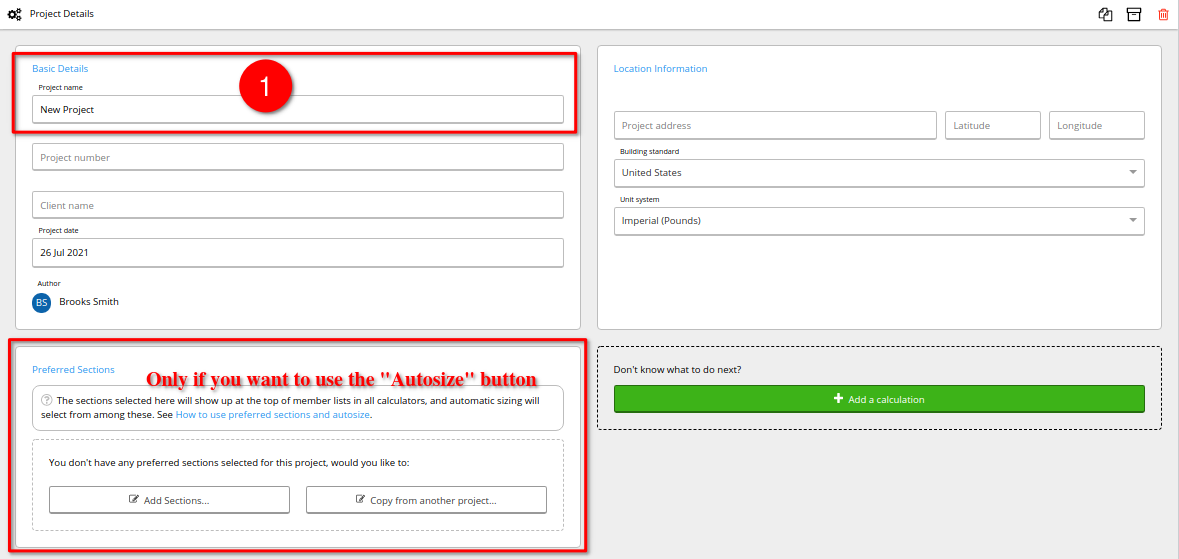
Everything else can safely be left blank or otherwise as-is. The Building Standard and Unit System are important, but unless you’re an employee in a multi-national consultancy, both should have already defaulted to whatever you selected when you first signed up for Calcs.com (or you can change it in your organization settings here). If you enter an address, we’ll use that to set some environmental parameters, particularly in our wind load modules, but everything can also be set manually in those modules. All of the other fields, including client name, project number, and date are only there for your own reference and for populating the header at the top of any reports you print; there is no consequence to leaving them blank. Preferred Sections is only necessary if you wish to use our Autosize feature. Some of our member databases have literally thousands of section sizes and shapes to choose from, and we unfortunately can’t test every single one to find the optimal size (and even if we did, you may or may not actually be able to acquire the most optimal section from your suppliers!) - so we instead ask you to select a list of “Preferred Sections” from among which we’ll find the most optimal when you click the “Autosize” button in our various calculators.