> ## Documentation Index
> Fetch the complete documentation index at: https://calcs.com/docs/llms.txt
> Use this file to discover all available pages before exploring further.
# How to Cantilever or Overhang a Beam (Fixed or Propped)
> Set up fixed or propped cantilevers and overhangs in Calcs.com beam calculators, and understand how per-span deflection limits are checked.
Calcs.com supports unlimited spans and allows fixed or propped cantilevers on either or both sides of a beam.
By default all newly created beams are simply supported, with supports located at 0ft (or mm) and equal to span length respectively (this is denoted by a yellow cell which has the formula =L). To edit spans, or make a beam a cantilever:
1. Specify the **total length of the beam** in the key properties section (for example, 14ft)
 2. Edit the **support location table** below and add or remove supports as you desire. N.B. Calcs.com assumes all locations of loads and supports as *distance from the left.* As you amend the support locations, the diagrams on the right hand side of the screen will automatically update to reflect your changes.
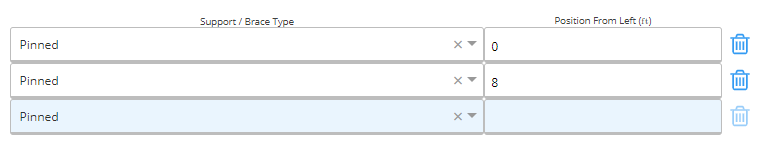
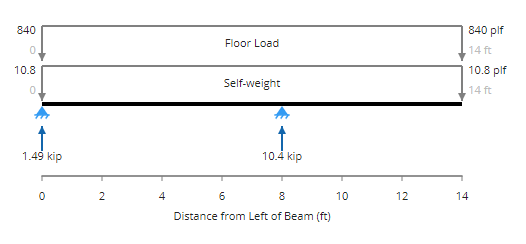
Example 1: 14ft simply supported beam with the second support located at 8ft, creating a 6ft **propped cantilever** on the right hand side.
2. Edit the **support location table** below and add or remove supports as you desire. N.B. Calcs.com assumes all locations of loads and supports as *distance from the left.* As you amend the support locations, the diagrams on the right hand side of the screen will automatically update to reflect your changes.
Example 1: 14ft simply supported beam with the second support located at 8ft, creating a 6ft **propped cantilever** on the right hand side.
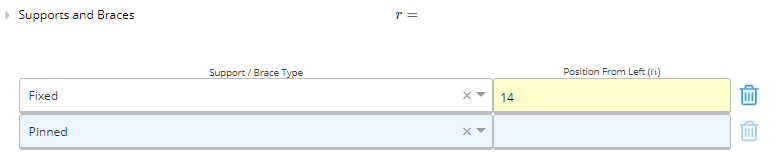
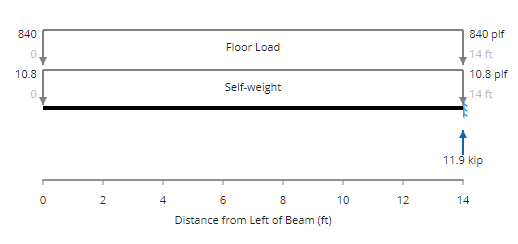
 Example 2: 14 ft **fixed cantilevered beam** with a single fixed support on the right hand side (i.e. located at 14ft).
 The examples above are for relatively simple beams, however you may continue to add as many spans or braces as you would like.
## How deflection is checked per span
Calcs.com evaluates deflection **per span segment**, not over the full member. Each segment between supports is checked independently against its own deflection ratio (L/ratio) limit, and the **L** used in that check is the length of that segment, not the total length of the beam.
This matters most on cantilevered or overhanging members. The cantilever end is its own segment, and because its **L** is small, the absolute deflection allowance is tight. A modest tip deflection can fail the cantilever check even when the rest of the beam looks fine and the overall member appears well within typical limits.
This is expected behaviour. Each span gets its own allowance based on its own length, so short segments will always have stricter absolute limits than longer back-spans. If a cantilever is governing on deflection, the fix is typically to stiffen the section, shorten the overhang, or relax the deflection ratio for that segment if your design criteria allow it.
The examples above are for relatively simple beams, however you may continue to add as many spans or braces as you would like.
## How deflection is checked per span
Calcs.com evaluates deflection **per span segment**, not over the full member. Each segment between supports is checked independently against its own deflection ratio (L/ratio) limit, and the **L** used in that check is the length of that segment, not the total length of the beam.
This matters most on cantilevered or overhanging members. The cantilever end is its own segment, and because its **L** is small, the absolute deflection allowance is tight. A modest tip deflection can fail the cantilever check even when the rest of the beam looks fine and the overall member appears well within typical limits.
This is expected behaviour. Each span gets its own allowance based on its own length, so short segments will always have stricter absolute limits than longer back-spans. If a cantilever is governing on deflection, the fix is typically to stiffen the section, shorten the overhang, or relax the deflection ratio for that segment if your design criteria allow it.
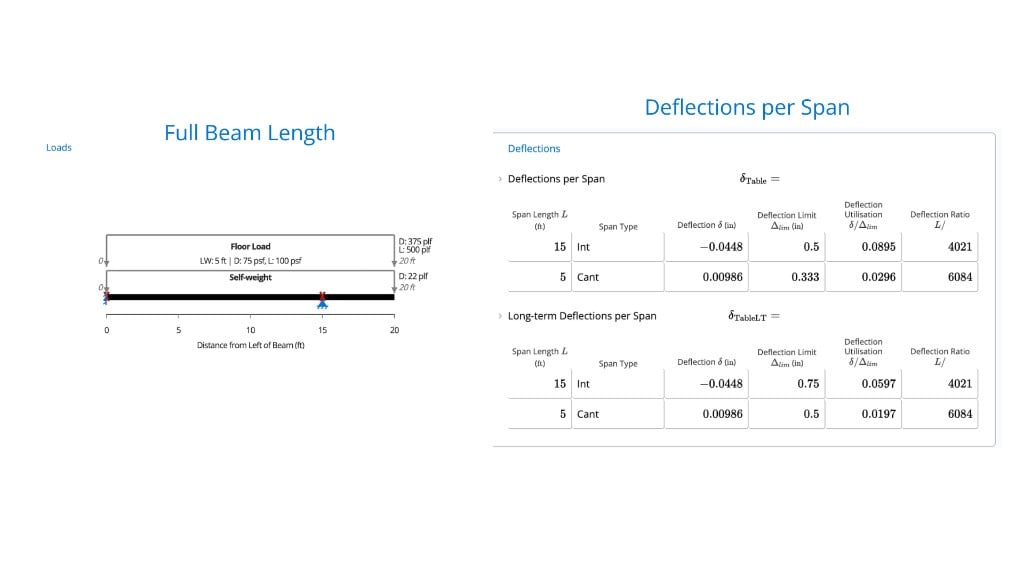 *Each span segment is checked independently: the 15 ft interior span and 5 ft cantilever each have their own deflection limit, utilisation, and L/ratio.*
## Related
* [How to enter beam supports (imperial units)](https://calcs.com/docs/running-calculations/setting-up-a-calculation/geometry-and-supports/how-to-enter-beam-supports-imperial-units)
* [How to enter beam supports (metric units)](https://calcs.com/docs/running-calculations/setting-up-a-calculation/geometry-and-supports/how-to-enter-beam-supports-metric-units)
* [Measuring utilization or adequacy of a design](https://calcs.com/docs/running-calculations/checking-results/understanding-checks/measuring-utilization-or-adequacy-design)
*Each span segment is checked independently: the 15 ft interior span and 5 ft cantilever each have their own deflection limit, utilisation, and L/ratio.*
## Related
* [How to enter beam supports (imperial units)](https://calcs.com/docs/running-calculations/setting-up-a-calculation/geometry-and-supports/how-to-enter-beam-supports-imperial-units)
* [How to enter beam supports (metric units)](https://calcs.com/docs/running-calculations/setting-up-a-calculation/geometry-and-supports/how-to-enter-beam-supports-metric-units)
* [Measuring utilization or adequacy of a design](https://calcs.com/docs/running-calculations/checking-results/understanding-checks/measuring-utilization-or-adequacy-design)