> ## Documentation Index
> Fetch the complete documentation index at: https://calcs.com/docs/llms.txt
> Use this file to discover all available pages before exploring further.
# View All Detailed Calculation Steps
> How to view all detailed calculation steps
If you would like to understand a calculation on a deeper level, Calcs.com includes the capability to toggle onto 'Detailed' view, which includes all intermediate steps and calculations used in our calculators. This is very useful if you would like to follow through all the mathematical steps we use to calculate bearing capacity for example.
To toggle into detail mode, open the calculation you would like to view the detailed calcs for, expand its **Details** (top right corner of the page), and then select the '**Detailed**' toggle at the top of the page. See below screenshot for an example. Once you have toggled into detailed mode, additional calculations will appear in the below screen, including expandable references and equations.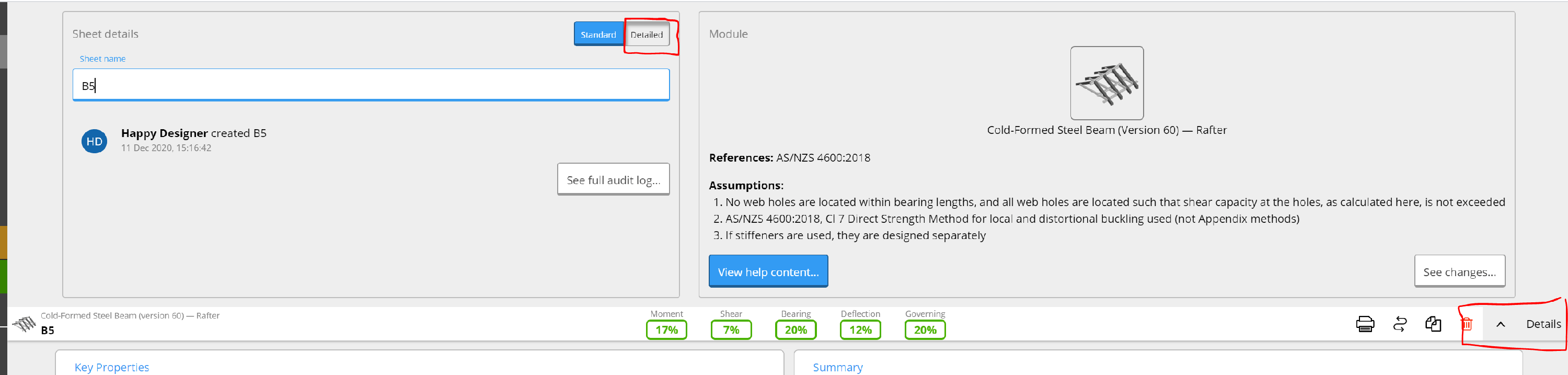 ## Frequently asked questions
Reviewers can trace any output back to inputs, formulas, units, and standards references in one view. Approvals are based on visible reasoning, not reconstruction. This makes sign-off faster and more consistent as teams grow.
Yes. Every formula, input, and referenced clause is visible, and you can export a signed-off PDF report. Reviewers follow the logic instead of rebuilding it.
## Frequently asked questions
Reviewers can trace any output back to inputs, formulas, units, and standards references in one view. Approvals are based on visible reasoning, not reconstruction. This makes sign-off faster and more consistent as teams grow.
Yes. Every formula, input, and referenced clause is visible, and you can export a signed-off PDF report. Reviewers follow the logic instead of rebuilding it.